


Teasing Simulator Home App
4.610.00 Reviews
App Specs
- Version
- 1.0
- Updated On
- License
- Free
- Downloads
- 10,000+
- Developer
- Hadiz Studio
- Categories
- Personalization
- Platform
- Android
Screenshots
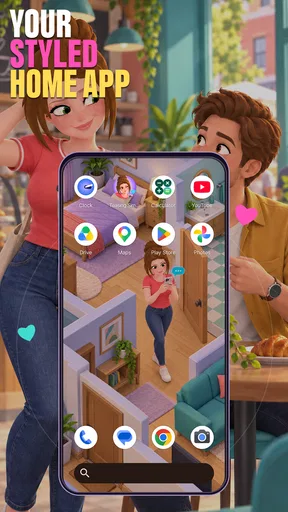

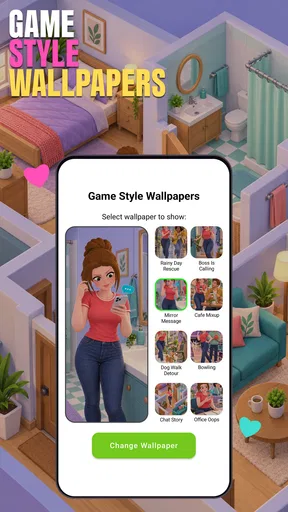
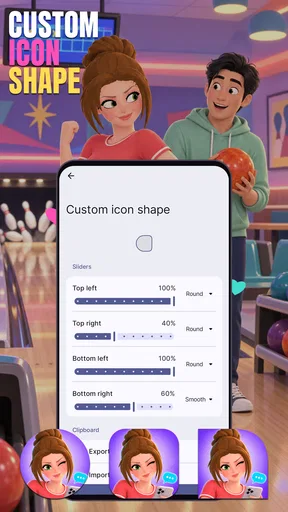

 Analysis by AppCompare
I’d approach Teasing Simulator Home App as a playful personalization download with a deliberately narrow promise: it is meant to add a teasing-simulator theme to the phone experience, not to replace a general launcher or a full customization toolkit. That distinction matters. If you want a small, mood-setting change and enjoy lighthearted, flirtatious humor, the idea may appeal. If you expect detailed controls over icons, widgets, layouts, or interactive scenarios, I would set those expectations aside before installing.
What to check before making it your everyday setup
Before installing, I would decide whether I want a themed experience to use for a while or a new home screen I can rely on for every task. That distinction makes the trial easier to judge. If my goal is simply to break up a familiar look for an evening, a narrow concept can be enough; if I need a lasting interface, I would want dependable controls and a clear sense of how it fits my routine.
I would also think about where the phone is used. A theme that feels amusing in private can be less comfortable when a colleague, friend, or family member glances at the display. That is not a technical drawback, but it affects whether the app is a sensible everyday choice. If you often show your phone to other people, consider testing it in the situations where you normally use your device before settling on it.
A playful idea with a specific audience
Hadiz Studio places this app in the personalization category, and its Teen age rating is worth considering before handing the device to a younger user. The premise is aimed at people who find teasing-style humor entertaining and want that tone reflected in their phone setup. It is not an obvious fit for someone looking for a neutral productivity home screen or a broad collection of visual themes.
The name can suggest a more elaborate simulation than the app’s brief premise establishes. I would read “simulator” here as a playful concept, not assume that it means a deep role-playing system or a detailed relationship game. That gap between a catchy name and a user’s imagined feature set is the main expectation to manage: the appeal depends on enjoying the theme, rather than arriving with a checklist of advanced tools.
The app is free to download, so trying the concept does not require a purchase. That is a useful, concrete part of its value, but it does not tell me how much customization or content a person will find after opening it. I would judge the download as a low-commitment experiment, not as a promise of a complete personalization suite. If you prefer to know precisely what every screen and setting offers before installing, a more fully documented alternative may suit you better.
What the free download is worth
There is a meaningful difference between “free to download” and “guaranteed to provide a particular amount of content.” The first is clear here; the second should not be assumed. I would not treat the absence of a listed purchase price as evidence about every possible in-app option, nor would I budget for a paid upgrade without seeing one presented in the app. The sensible approach is to install only if the core concept itself sounds enjoyable, then decide whether the experience earns space on your phone.
Worth Reading Before You Choose

EA SPORTS FC Mobile 26 Is a Bigger Football Game, but It Takes Time

Flipboard Shows What News Apps Must Do Beyond the Feed

Switching to Android Auto Means Rethinking Your Driving Routine

Google Calendar Makes a Crowded Week Easier to Manage

Ludo King Makes the Most of the Minutes Between Plans

Baby Panda World Brings Quick Play to Modern Phones, but Its Game Library Feels Busy
That makes the value equation personal. Someone who wants a quick, novelty-driven change may find the free entry point appealing even if the app is not a permanent part of their setup. Someone who expects a polished, highly configurable home-screen replacement may value a conventional launcher more, because its purpose and control options are usually easier to evaluate in advance. The choice comes down to whether the teasing theme is enough to make a small customization feel worthwhile.
The listing shows an average rating of 4.6 from 757 ratings, alongside 10 written reviews. That gives a little context about how other users have responded, but it does not reveal which parts they liked or whether their expectations matched yours. I would use the rating as a prompt to investigate further rather than as proof that the app will suit every phone or taste.
How to judge the experience without overexpecting
For a personalization app with a sharply defined theme, I would first ask whether the concept is the reason I am downloading it. If the answer is yes, the premise can carry the experience even if it is modest. If the answer is “I need a new launcher with extensive control,” then the theme alone is not enough to establish that it will meet the need. Keeping those two goals separate helps avoid mistaking a themed app for a general-purpose customization tool.
A practical first-session test is to notice what changes in your everyday interaction with the phone, not just whether the concept sounds amusing on the opening screen. Does the presentation feel comfortable to see repeatedly? Is the tone appropriate around other people who might glance at your screen? Does it make you want to keep the setup, or does the joke wear thin after the initial novelty? These are better measures of long-term value than the name alone.
One useful tip is to try it during a low-stakes period rather than changing your phone immediately before work, school, or travel. That gives you a chance to decide whether the app’s style fits your routine without making an unwanted theme part of a busy day. If you share a device, or regularly hand your phone to family, consider whether the teasing tone will feel comfortable in those settings before making it your everyday default.
Where it may fit into daily use
Imagine having a quiet evening and wanting your phone to feel less plain without spending time building a carefully coordinated setup. A themed personalization app can be a good fit for that kind of brief experiment: you are choosing a mood, not necessarily redesigning every part of the device. The key trade-off is that a novelty-oriented concept may be fun in short bursts but less satisfying if you want a restrained look that stays unobtrusive all day.
Another useful scenario is a secondary device used mainly for casual browsing or entertainment. A playful theme can make sense there because the phone’s presentation does not need to meet the same professional or practical expectations as a work device. By contrast, I would be cautious about choosing it as the main setup for someone who needs a highly predictable interface, especially if they rely on familiar arrangements to move quickly between daily tasks.
There is also a social side to personalization that is easy to overlook. A teasing theme may be intended as private amusement, but phone screens are often visible in public, during meetings, or when showing someone a photo. If you would feel awkward explaining the concept in those moments, that is a real reason to choose a subtler alternative. Personalization is only useful when the result feels comfortable in the places you actually use your phone.
Trade-offs compared with familiar alternatives
Compared with a standard launcher, this app’s strongest distinction is its specific playful identity rather than an established promise of broad control. A mainstream launcher is generally the more sensible choice when the priority is adjusting a layout, keeping a clean home screen, or making routine navigation feel familiar. A themed personalization app is more compelling when the theme itself is the point and you are happy to trade some predictability for a more unusual presentation.
It is also different from choosing a wallpaper or icon pack on its own. Those options can give a phone a new look while leaving the rest of the familiar interface untouched, which is often better for people who want a subtle change. A simulator-themed app may appeal more to someone who wants a concept with a playful identity, but the name should not lead you to assume it includes specific visual assets or interactive features beyond what you encounter after installation.
That uncertainty is not a reason to dismiss it; it is a reason to keep the trial proportionate. Start with the free download, explore what is actually available, and avoid making a larger commitment until you know whether the tone and presentation work for you. If it does not click quickly, switching back to a basic wallpaper or a familiar launcher is a reasonable decision, not a failure to give the app a fair chance.
Who is likely to enjoy it—and who should pass
I can see this being a better match for people who enjoy cheeky humor, like trying distinctive phone themes, and do not need every app to become a permanent part of their setup. The free entry point makes it easier to test that preference. It may also suit someone looking for a light diversion rather than a serious customization project, provided the Teen rating and the theme feel appropriate for the intended user.
I would pass if you want a neutral interface, dislike flirtatious or teasing presentation, or need precise controls that you already know you want. I would also choose another option for a shared or child-focused device unless the theme is clearly suitable for everyone who uses it. For a practical redesign, pick a launcher or straightforward personalization tool whose controls and scope are central to its purpose; for a quick change of mood, this concept may be enough.
Hadiz Studio’s release is version 1.0, and it is listed for Android 8.0 and later. Those details make compatibility worth checking before you spend time installing it, particularly if you are using an older device. The app has 10K+ installs, which shows that people have tried it, but I would still make the decision based on whether this specific style appeals to you rather than treating popularity as a substitute for fit.
My verdict on trying it
My recommendation is a cautious yes for curious users who want a free, playful personalization experiment and a clear no for anyone expecting a fully featured launcher or a deep simulator. The best reason to try it is the theme itself; the weakest reason is assuming the title guarantees a particular set of tools. Decide what you want from your phone before you install, then judge the actual experience against that modest goal.
With a 4.6 average from 757 ratings, the app has a positive overall reception, though the small number of written reviews offers less detail about day-to-day use. I would treat that as a helpful signal, not a personal guarantee. In the end, its value is the chance to try a distinctive theme for free, balanced against the possibility that a narrow, novelty-led idea will not suit your routine. If that trade-off sounds fair, it is worth a look; if you want dependable, extensive customization, choose a more conventional option instead.
A practical way to make the decision
If you are unsure whether the concept will suit you, I would treat the first few minutes as a compatibility check for your taste, not just your device. Look at how the app presents its theme, notice whether the tone feels comfortable, and ask whether it adds something you would actually enjoy seeing again tomorrow. This simple test prevents the common mistake of keeping a novelty app merely because it was amusing once.
It is also worth separating visual appeal from convenience. A playful presentation can be engaging without making routine actions easier, while a plain launcher may be less distinctive but better for quick, reliable navigation. If you use your phone mainly to get through messages, appointments, and everyday tasks, convenience should probably win. If you are deliberately looking for a lighthearted change and can tolerate a more limited purpose, the unusual theme may be the more satisfying choice.
For parents or anyone choosing an app for a shared device, I would make the decision together with the people who will see and use it. The Teen rating is a useful signal to take seriously, but personal comfort matters too: humor that one person finds harmless may feel awkward to someone else. A quick conversation can save the hassle of setting up a theme that another regular user immediately wants removed.
Ultimately, the strongest reason to give it a chance is that the idea itself makes you curious, while the strongest reason to skip it is needing practical customization more than personality. I would not install it expecting a particular collection of tools, nor would I dismiss it just because it is narrowly focused. For the right person, a small, distinctive change is enough; for everyone else, a wallpaper or familiar launcher is likely the more predictable choice.
Pros
- Simple controls make it easy to start teasing and interacting with the home setting.
- Lighthearted gameplay offers a casual change of pace from more demanding games.
- The home environment provides a familiar
- easy-to-understand setting.
- Short play sessions suit quick breaks.
- Free-to-play access lets you try the game before spending money.
Cons
- The teasing-focused premise may not appeal to every player.
- Gameplay can feel repetitive after the novelty wears off.
- Ads or in-app purchases may interrupt the experience.
- Progression and objectives may feel limited for experienced players.
- The humor and interactions may be more suitable for a mature audience.
FAQs for Teasing Simulator Home App
What is Teasing Simulator Home App?
Teasing Simulator Home is presented as a casual simulation game centered on playful teasing in a home setting. The exact activities and features can vary by version, so check the app’s store listing and screenshots before installing. Those details are the best way to confirm whether its style of humor, gameplay, and overall tone match what you are looking for.
Is Teasing Simulator Home free to download and play?
The app may be available to download without an upfront charge, but that does not necessarily mean every feature is free. Depending on the release, it could include advertising, optional purchases, or other monetized content. Review the current Google Play or App Store listing for pricing and in-app purchase information, and check your device’s purchase settings before letting children use the app.
What permissions or personal information might Teasing Simulator Home require?
The permissions requested depend on the version, device, and distribution source. Before installing, review the permission prompts and the developer’s privacy information, paying particular attention to access to photos, contacts, location, or other sensitive data. A casual game should only need permissions relevant to its features. If a request seems unnecessary, you can deny it where your operating system allows.
Can I play Teasing Simulator Home offline, and what devices support it?
Offline access and device compatibility cannot be assumed from the app’s title alone. Some games require an internet connection for ads, updates, or online features, while others allow their main gameplay offline. Check the store page for minimum operating-system requirements and connection notes, then confirm that your phone or tablet has enough free storage and runs a supported version of Android or iOS.
Is Teasing Simulator Home suitable for children?
The word “teasing” can describe different kinds of humor or interactions, and the title alone does not establish whether the game is appropriate for children. Check its official age rating, screenshots, content description, and user reviews before downloading. If a child will play, consider testing the app yourself and using parental controls to manage purchases, advertising exposure, and access to online features.


